Your A.I. archery coach

Every arrow, measured.

Snap a photo of your target. BowWizard finds every arrow, measures your groups, and coaches you like someone who's been watching all season, one target in the backyard or a whole course of them.

free·any phone·works offline at the range
A target photo with every arrow found and each group measured
SPOT 13.4″group · sits high
SPOT 22.3″slightly high & right
arrows found automatically groups measured in inches rounds scored by ring coached on your own history
Three ways to shoot

Whatever you're shooting today.

A bag target with every arrow found and each aim spot marked
MODE 01

Practice a target

Shoot your sets at one target. Every group measured and tracked, so "that felt good" becomes "an inch tighter than last month."

A course round with each target's photo and distance read
MODE 02

Shoot a course

3D animals, field faces, bags, known or guessed distances. Snap as you go and learn how well you read distance, not just how you shoot.

A Vegas three-spot face with every arrow scored
MODE 03

Score a round

Shoot a Vegas 300 on the three-spot. Every arrow scored by ring to a total out of 300, with your group size right alongside.

How it works

Shoot like normal. Snap a photo. That's it.

No sensors on your bow, no special targets. Your phone camera is the whole setup.

01

Shoot, then snap

Photo the target before you pull your arrows. No signal needed, the backyard and the range both work offline.

02

Your arrows are found

BowWizard spots where every arrow landed and pairs it with the spot you were aiming at, even on a well-worn target.

03

Real numbers, not vibes

Group size and drift, measured set by set and session by session, so you can watch yourself get better.

Real targets, real finds

Worn bags, shredded faces. It finds them anyway.

Every arrow numbered, every aim point matched, every group measured, straight off photos like these.

A speedbag with nine arrows found across three aim spots, each group measured
Nine arrows across three spots on a battered bag, every one found, every group measured
A worn four-spot face with each arrow numbered and matched to its aim point
A face full of old holes, each arrow still matched to the spot it was aimed at
Arrows still in a cardboard target, group read at 1.8 inches
Arrows still in the target, shot from an angle, group read at 1.8″ and called left
A coach in your pocket

It reads everything you've shot, then tells you the one thing to fix.

After each session: a graded report card and a note on every set. The Coach goes deeper, whether you always drift the same way, whether your last sets fade when you tire, which of your setups truly groups best, then one clear goal to chase next.

Know you're improvingGroups tracked against your own history.
Prove out new gearSee which bow or arrows really group better.
Spot your bad habitsDrift low-left when you tire? The numbers show it early.
Yours stays yoursFriends who join see their shooting, never yours.
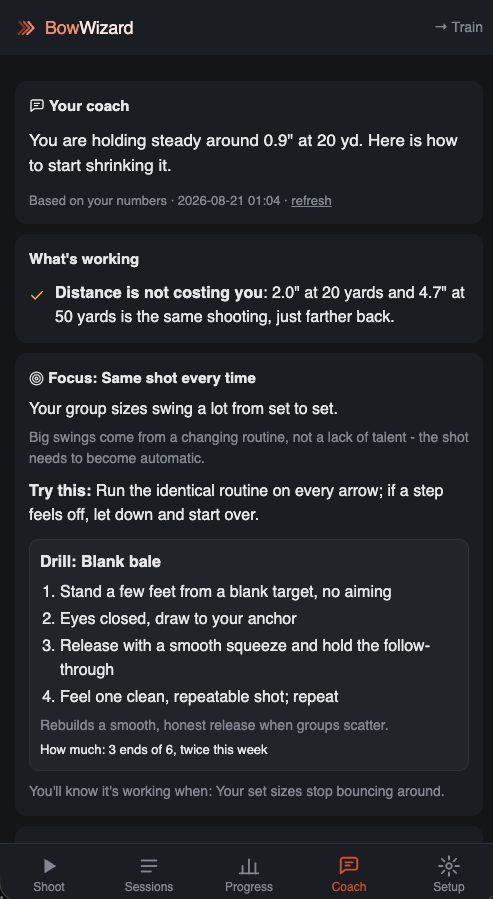
The Coach tab: what's working, what to work on, a next goal
THIS SESSIONA−tighter than your recent form
NEXT GOALHold under 2.5″ at 30 yds for three sessions
See it in action

Inside the app.

A session report card graded A minus with per-set notes
A graded report card after every session, with a note on every set
Progress charts: group size shrinking over time
Watch your groups tighten week over week, distance by distance
The sessions list: courses, practice and scored rounds with target photos
Every session kept, courses, practice and scored rounds
Who it's for

If you shoot a bow, this is for you.

Backyard shooters chasing tighter groups Competition archers chasing every point Hunters dialing in for the season New archers learning consistency 3D & field shooters reading distance Parents tracking a kid's progress Tinkerers proving out gear changes
Install the app

Straight from this page. No app store.

Installed, BowWizard opens full screen from your home screen and works with no signal at the range.

  1. Open bowwizard.com in Safari (installing only works from Safari).
  2. Tap the Share button, the square with an arrow pointing up.
  3. Scroll down, tap Add to Home Screen, then Add.

Already installed? Open BowWizard from your home screen.

Your next session could be your first measured one.

Free. Works on any phone. Nothing to buy, nothing to clip on your bow.

Start a session